
 Docs
Docs
HubCreate documentation
Find all the guides and resources you need to get up and running with HubCreate.Drift Events & Actionable Remediation
Data points are useful, but context is king. The HubCreate Signals Tool uses a "Pattern Matching" engine to group related flags into Drift Events. Instead of seeing five separate alerts for missing properties, you receive a single, cohesive event that explains the business impact and provides a step-by-step remediation plan.
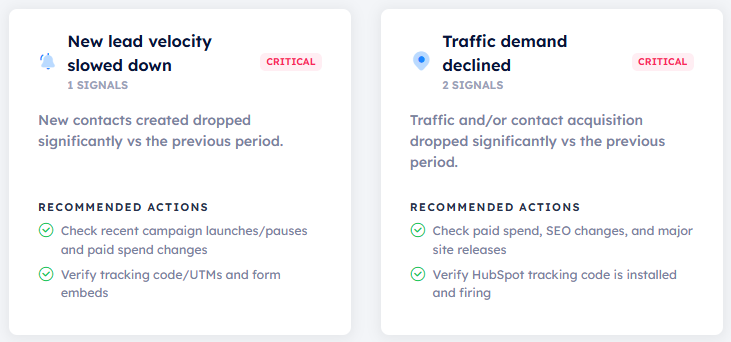
A Drift Event consolidates multiple flags into a single high-level business risk.
From Signal to Solution
The true power of Drift Events is the Recommended Actions. Our engine doesn't just point out the problem; it serves as a virtual HubSpot Consultant. For every event, you get a tailored checklist:
Example Checklist: CRM Pipeline Stagnation
- Step 1: Audit the 'Contract Sent' and 'Negotiation' stages for blockers.
- Step 2: Review Sales Enablement materials for stages where deals are stalling.
- Step 3: Run a 'Stale Deal' cleanup to move non-responsive leads to 'Long Term Nurture'.
- Step 4: Check for overdue close dates in active sales cycles.
Operationalizing Drift Events in Your Agency
We recommend incorporating Drift Events into your Weekly Internal Syncs. Instead of spending hours hunting for issues across your clients' portals, your team can simply log into HubCreate, identify any "Red" Drift Events, and assign the pre-written Recommended Actions to an account manager as a task.
Continuous Improvement
As you resolve the issues identified in a Drift Event, the underlying flags will clear in the next monitoring cycle, and your Daily Health Score will automatically rebound.