
 Docs
Docs
HubCreate documentation
Find all the guides and resources you need to get up and running with HubCreate.Understanding Workflow Audit Scores, Flags & Grades
The HubCreate Workflow Audit doesn't just give you raw data; it provides a weighted assessment of your portal’s health. By translating technical configurations into a familiar A–F Grading System, we help you quickly communicate the state of a portal to stakeholders and prioritize your technical debt reduction.
The Scoring Algorithm
Your scores are calculated by assigning a Severity Weight to every flag detected. A "Critical" flag impacts your score significantly more than an "Info" or "Low" flag. The scores are aggregated across five key pillars:
- Documentation: Measures the presence of descriptions and goal-setting.
- Operational Hygiene: Identifies technical debt like "Ghost" or "Zombie" workflows.
- Performance: Tracks active HubSpot issue counts and execution failures.
- Freshness: Flags high-volume logic that hasn't been updated in 180+ days.
- Activity Health: Monitors for runaway spikes or sudden drops in enrollment.
Common Flags & What They Detect
Based on our audit_engine logic, here are some of the most critical flags you may encounter in your report:
| Flag Code | Severity | Detection Logic |
|---|---|---|
| RUNAWAY SPIKE | Critical | Detected when >40% of total lifetime enrollments happen in the last 7 days. |
| NEGLECTED_CRITICAL | High | High-volume logic (2000+ enrollments) that hasn't been updated in 6 months. |
| ZOMBIE WORKFLOW | Medium | Workflows that are "ON" but have had zero enrollments in the last 7 days. |
| BUS FACTOR | Info | A summary metric showing if more than 50% of your portal logic was created by a single user. |
Analyzing the Workflow Table
The All Workflows table is your primary tool for triage. For every workflow, you can see the specific hint generated by the engine (e.g., "Add a summary of the workflow's goal" or "Deactivate to reduce portal overhead").
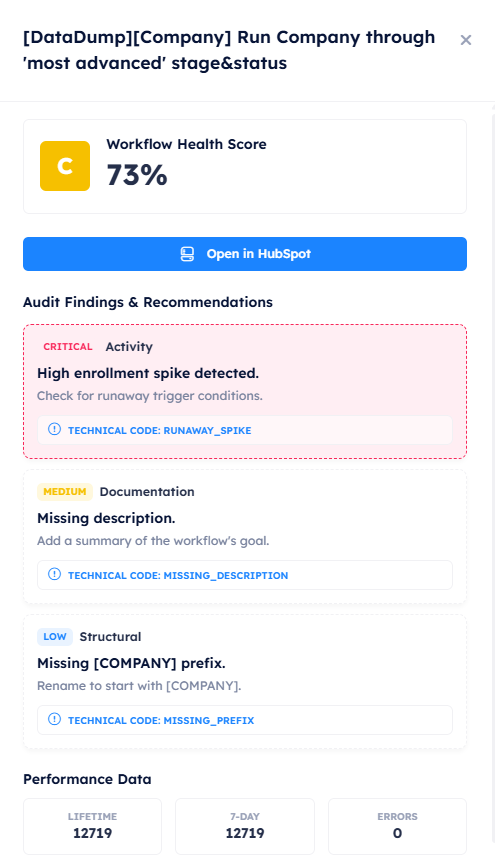
The granular view allows you to see specific issues, severity levels, and direct links to the HubSpot editor.
How to Prioritize Fixes
We recommend the "Top-Down" approach: Focus on Critical and High severity flags first, especially those in the Performance and Activity categories, as these directly impact your HubSpot data integrity.